One Vocabulary List, Every Course That Needs It
Or: thirty years of e-learning standards, and nobody specced a glossary.
July 30, 2026 — By Brent Miller
Every language teacher keeps a vocabulary list. It may be the single most universal artifact in education — older than the whiteboard, older than the photocopier.
So here is a strange fact. SCORM does not have a glossary object. Common Cartridge does not have one. Neither does QTI, LTI, or xAPI. Thirty years of standards for moving learning material between systems, and there is still no agreed way to hand someone a vocabulary list as a thing rather than as a web page.
Moodle is the honourable exception. Its glossary has a real import and export, with aliases, categories, even auto-linking. It has been quietly right about this since the 2000s. But it is an island: the moment your glossary leaves Moodle, it is frozen HTML again.
So teachers solved it themselves, with extra work. The world’s vocabulary lists live in Quizlet sets and Anki decks — outside the course, in flashcard silos. And most of us end up typing the same words into three different places.
The symptom you already know
You build a bilingual science course and write 200 vocabulary items: term, translation, an example sentence, maybe a recording.
Next term you build a second bilingual science course — different students, mostly the same words. So you do it again. Or you copy the file, and now you have two copies that will slowly disagree with each other. Fix a typo in one, and the other keeps the typo forever.
The problem is not effort. The problem is that in almost every tool, a vocabulary list is not an object. It is part of a course, and it cannot exist anywhere else.
What we changed
In Lesson Commons, a glossary is its own document. Not a page inside a course — a document, with its own identity, that a course refers to.
That one decision does the work. Because a glossary is a separate thing, it can be attached to a course, a unit, or a single lesson — and to more than one course at the same time.
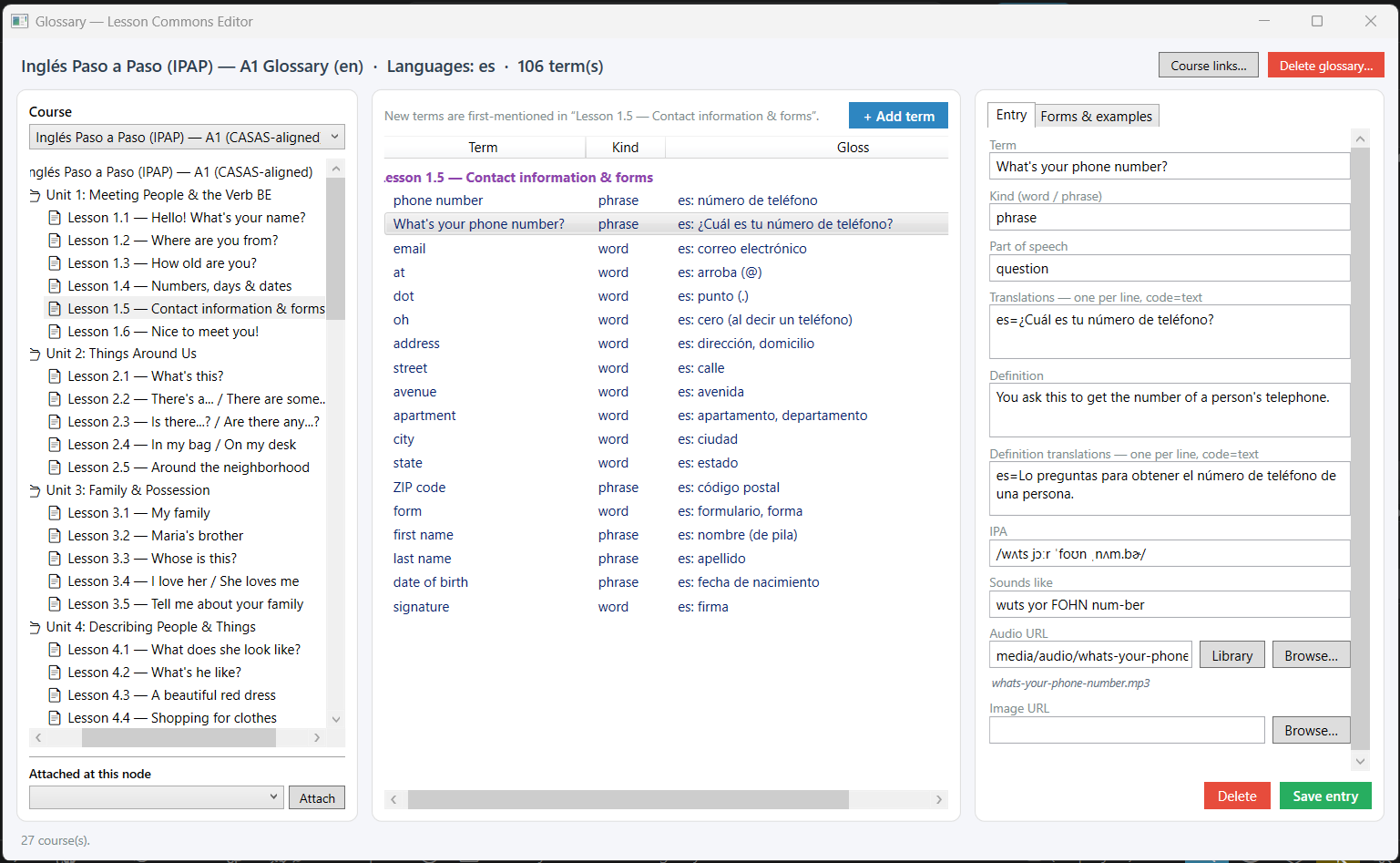
In practice: the Glossary window has a Course links panel that shows you everywhere a glossary is being used — every course, unit, and lesson that draws on it. Paste in the IDs of any additional courses that should draw on it, and one list serves all of them. Correct a definition, add a missing plural, replace a bad recording — every course linked to it has the change immediately. There is no sync step, because there is nothing to sync. There is only one list.
The audio works the same way. A recording belongs to the vocabulary list itself, not to a course folder. Record or generate “il pane” once and every course that draws on that list has it. You never re-record a word you have already recorded.
What your students get
Students get a real glossary page in the course, not a downloadable PDF. They can read it grouped by lesson — the order you actually taught the words in — or switch to A–Z when they are looking something up. They can filter it. They can print it, and the toolbar and navigation disappear so what comes out of the printer looks like a study sheet.
Each entry can carry a definition, translations, example sentences, part of speech, IPA, a “sounds like” respelling for students who find IPA intimidating, an image, and audio. It is a vocabulary notebook, written once, that follows the words wherever they are taught.
One honest limitation
Grouping terms by the lesson where they first appear works for the course you authored the glossary in. Attach the same glossary to a second course and the students there get the full list — terms, definitions, examples, audio, all of it — but grouped as reference vocabulary rather than lesson by lesson, because the second course has different lessons.
We know this, and we are building the missing piece: a publish step that works out where each word first appears in the second course and levels the list for it. Until that lands, cross-course attachment gives you a shared reference glossary, which is genuinely useful and honestly less than we want it to be.
Why this is worth doing properly
A vocabulary list is not a small thing dressed up. For a language learner it is the spine of the course. It deserves to be a document you own, that you can read, export, and carry to another system — not a table trapped in someone else’s database.
Lesson Commons is in open beta, free while we build. If you have ever retyped the same word list into a new course, we would like you in the room while we get this right. Visit lessoncommons.com/beta.
Lesson Commons is an educational software platform for teachers and trainers. The editor, delivery platform, and open transfer format (LC-JSON) are in active development. Follow our updates at lessoncommons.com/news.
This article was written with the assistance of Claude (Anthropic). The author defined the purpose, audience, and main ideas, contributed the personal teaching experience, directed the research and editorial approach, and edited the final text. Claude assisted with research, brainstorming, a first draft, and fact-checking every claim against what the software actually does.